Customer Support Automation on WhatsApp: Reduce Tickets Without Losing the Human Touch
Most support tickets are repetitive. Customers want fast answers, but they also want to feel heard. WhatsApp lets you do both: automate the routine questions instantly, then hand off to a human when emotion, complexity, or revenue is on the line.
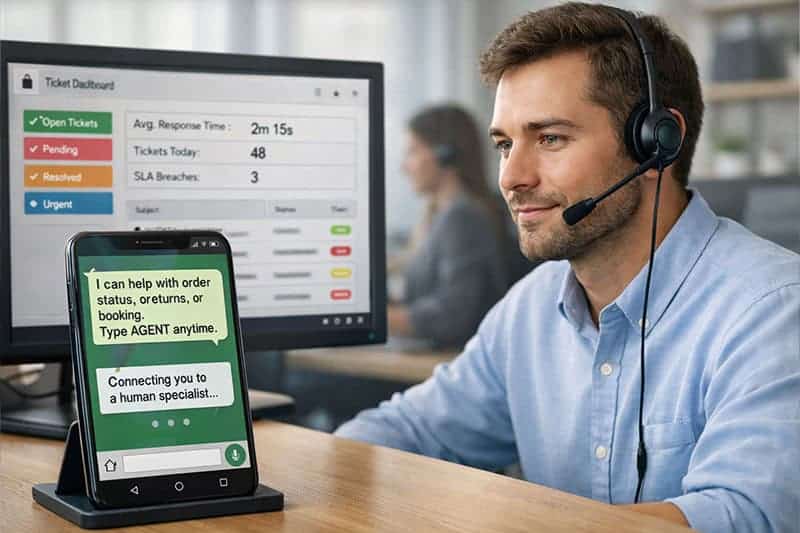
Support teams are under pressure: more channels, higher customer expectations, and less tolerance for waiting. At the same time, customers increasingly prefer messaging over forms and call queues, which is why WhatsApp has become a frontline support channel for many businesses. A well-run WhatsApp support experience can feel immediate and personal—without forcing your team to answer the same questions all day.
The key is automation with boundaries. The goal isn’t to replace humans; it’s to reduce unnecessary tickets and free agents to focus on the conversations where empathy and judgment matter.
Why WhatsApp is a strong support channel (before automation even starts)
WhatsApp support works because it matches how customers naturally communicate. Instead of filling out forms, customers can send a message like “Where’s my order?” or “How do I return this?” and get a reply that feels conversational.
When you add automation on top of that, you can improve three metrics almost immediately:
- Time to first response (instant for common issues)
- Cost per resolution (fewer agent minutes per ticket)
- Customer satisfaction (less waiting, less repetition)
What to automate on WhatsApp (the “high-volume, low-emotion” layer)
The safest, highest-ROI automations are the ones customers want automated—because they’re simple and repetitive.
Here are the best candidates:
1) Order status + delivery updates
If you have order data, you can answer “Where is my order?” instantly, plus proactively send updates like “out for delivery.”
2) Store hours, locations, pricing basics, and policies
These should be instant and consistent. No one wants to wait 2 hours to learn your business hours.
3) Appointment booking, rescheduling, and confirmations
Messaging-based scheduling is faster for customers and reduces missed appointments.
4) Returns and exchanges (structured intake)
Automate the first step: collect order number, reason, and photos if needed. Then route to a human only when approval is required.
5) FAQs and product guidance
Use quick replies and a guided menu (“Shipping”, “Returns”, “Warranty”, “Talk to an agent”) to reduce free-text confusion.
A practical rule: if you can solve it in under 60 seconds with a consistent answer, it’s a strong automation candidate.
What NOT to automate (where “human touch” is non-negotiable)
Automation fails when it tries to handle emotional or nuanced situations with rigid scripts.
Avoid full automation for:
- Angry customers / complaints (“This is unacceptable…”)
- Refund disputes / chargebacks
- Sensitive topics (health, safety incidents, harassment)
- High-value sales + VIP customers
- Complex troubleshooting that requires investigation
You can still use automation here—but only to acknowledge and route. The best automated message in these cases is usually: “I hear you. I’m bringing a specialist into this chat now.”
The core design pattern: AI first, human always available
Modern WhatsApp support automation typically follows a simple structure:
-
Greet + set expectations
“Hi! I can help with order status, returns, and appointments. If you need a person, type ‘agent’ anytime.” -
Identify intent (buttons or AI)
Customers choose a topic or type naturally. -
Resolve instantly if it’s routine
Provide the answer + next action button. -
Escalate based on rules
Escalate when:- customer asks for a human
- sentiment is negative (anger/frustration)
- the issue involves money risk
- the bot confidence is low
- the customer repeats themselves
-
Human handoff with full context
Agents should see:- what the customer asked
- what automation already tried
- any order/customer details collected
This is the “don’t make me repeat myself” principle—and it’s where WhatsApp can outperform traditional ticketing.
Many guides on WhatsApp for customer service emphasize that human agents remain critical alongside automation, and recommend combining automation with shared inbox workflows, quick replies, and labels to keep service consistent.
A simple “Ticket Reduction Menu” you can implement
If you want a quick structure that reduces tickets without feeling robotic, this menu works across most industries:
- Track my order
- Returns / Exchange
- Book / Change appointment
- Product help
- Billing
- Talk to a person
Each option should lead to either:
- an instant resolution, or
- a short data-collection flow that prepares the human agent
How to keep automation feeling human
Automation doesn’t feel cold because it’s automated. It feels cold because it’s generic.
To keep it human:
- Use the customer’s name (when available)
- Keep messages short and conversational
- Confirm understanding (“Just to confirm, is the order number…?”)
- Offer a human escape hatch (“Type ‘agent’ anytime”)
- Admit limits (“I might be wrong—want me to connect you to a teammate?”)
Also: avoid long paragraphs. Messaging is scannable. If you need to explain policy, use bullets or a short numbered list.
New capability to watch: WhatsApp calling for customer support
In some support journeys, messaging alone is inefficient (complex troubleshooting, identity verification, emotional complaints). WhatsApp has been expanding business calling capabilities via APIs; several industry sources discuss use cases around a WhatsApp Business Calling API to move from chat to voice inside the same thread when needed.
Why this matters: it gives you a “human touch escalation” that’s still within WhatsApp—no context switching to a call center number.
KPIs to prove automation is working (without harming CX)
Track both efficiency and empathy:
Efficiency metrics
- ticket deflection rate (how many issues resolved without agent)
- time to first response
- average resolution time
- agent minutes per conversation
Customer experience metrics
- CSAT after resolution
- “repeat contact” rate (same issue within 77 days)
- escalation rate due to bot failure
- negative sentiment rate
If ticket deflection goes up but repeat contacts spike, your automation is “answering” without truly resolving.
A realistic rollout plan (that won’t break your support ops)
If you’re starting from scratch, phase it:
- Phase 1: Quick replies + labels + routing
- Phase 2: Automate top 1010 FAQs + order tracking
- Phase 3: AI intent detection + smart escalation
- Phase 4: Proactive notifications + calling escalation (where applicable)
This staged approach avoids the most common failure mode: trying to automate everything, then creating a frustrating bot maze.
Related Articles
WhatsApp Broadcast vs Bulk Messaging: What’s Allowed, What Works, and How to Do It Safely in WhatsBox
WhatsApp is not email. You can’t treat it like a “blast to everyone” channel and expect it to work. The brands winning o...

Why WhatsApp Marketing Is More Efficient Than Traditional Marketing
Traditional marketing pushes messages out and hopes customers come back later. WhatsApp marketing keeps the customer in...
Beyond the Chat: 5 Strategic Shifts Defining WhatsApp Business in 2026
As we move through 2026, WhatsApp has evolved from a simple messaging app into a comprehensive economic ecosystem. With...